Quick Summary (under 100 words)
- 30+ copy-ready prompts organized by CX, EX, Product/SaaS, and Healthcare, aligned to common KPIs and moments that matter.
- Clear prompt framework covering role, goal, audience, constraints, and probing for deeper, faster insights.
- Practical guidance on personalization, channels, and real-time alerting to speed action from feedback.
- Metric-first mapping across CSAT, CES, NPS, and EES to drive decisions and close the loop.
Many organisations struggle to generate meaningful engagement from their surveys, not because stakeholders lack opinions, but because the questions fail to capture their attention or arrive at the right moment. Standard prompts like “On a scale of 1–10, how satisfied are you?” are easy to ignore and rarely inspire thoughtful responses.
The result is predictable: surface-level data that offers little strategic value. Generic survey questions produce generic answers, insights that fall short of revealing churn risks, product-market fit challenges, or early signs of employee burnout.
Imagine instead a survey experience where each question feels relevant, timely, and genuinely worth answering. One that uncovers the reasoning behind every score in real time, rather than weeks later.
That is the advantage of AI-powered survey questions, designed not just to collect data, but to deliver actionable insight at the moment it matters most.
Inside this guide, you’ll find 30+ copy-ready AI survey prompts organized by use case, Customer Experience (CX), Employee Experience (EX), Product/SaaS, and Healthcare. Each prompt is mapped to a key metric (CSAT, CES, NPS, or EES), ready to personalize, and primed for dynamic follow-ups that turn feedback into action before your window closes.
Better yet? We’ve included the exact framework to engineer your own prompts, so you’re never stuck with a mediocre question again.
Ready to stop guessing and start asking the right questions? Let’s dig in.
The AI Prompt Framework: Build Better Questions in 5 Steps
Not all AI questionnaires designs are created equal. And if you’re just copy-pasting templates into your survey tool, you’re leaving insight (and revenue) on the table.
The strongest prompts share a common structure, one that forces clarity upfront and makes personalization, routing, and analysis frictionless downstream. Think of it as the recipe for turning survey responses into decisions.
Here’s what separates a great prompt from the ones that land in the trash:
- Role & Goal, Start with Why
Define who is asking and what success looks like in a single sentence. Don’t skip this. It forces you to kill vague questions before they waste respondent time.
Example: “As a support lead, I want to understand post-ticket satisfaction to identify process gaps and predict repeat customer issues.”
- Audience & Channel, Meet Them Where They Are
SMS demands brevity (1–2 questions max). Email can breathe (4–5). A C-suite exec responds differently to “operational friction” than a frontline user does to “annoying steps.” Your prompts should too.
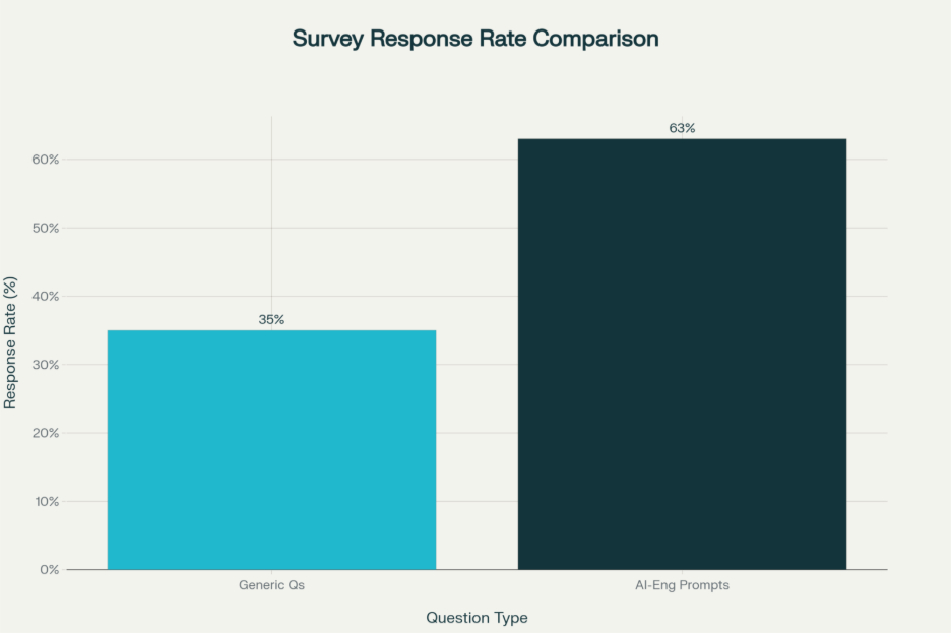
This isn’t busywork, it’s the difference between a 15% response rate and a 60%+ response rate.
- Constraints & Guardrails, Protect Your Data (and Respondents)
Set scope upfront. Are you asking about a single interaction or a relationship? Sensitive topics? Privacy compliance? State it clearly. This prevents scope creep, keeps responses focused, and signals you respect your respondent’s time and privacy.
Healthcare example: “We’ll use this feedback to improve access (encrypted, HIPAA-compliant).”
- Success Metrics, Anchor Every Question to Action
Tie each prompt to one KPI: – CSAT (satisfaction) → captures happiness post-interaction – CES (ease) → predicts loyalty and reduces support load – NPS (advocacy) → identifies promoters and detractors – EES (employee effort) → reduces friction and burnout.
Metric clarity = actionable insights. Vague metrics = months of analysis that doesn’t move the needle.
- Smart Probing, Dynamic Follow-Ups Are Where the Magic Happens
One-shot survey questions are dead. Modern prompts use conditional logic: – If score ≤ 3, ask “What went wrong?” – If score ≥ 8, ask “What should we do more of?” – If feature request, ask “How urgent is this?”
This depth cuts analysis time by 40% and accelerates decisions. You’re not guessing why someone’s unhappy, they’re telling you.
CX Prompts: Customer Journey Moments That Matter
Customer Experience doesn’t happen in a meeting room. It lives in moments, onboarding, support resolution, billing confusion, renewal decisions. Each moment is a chance to listen, measure satisfaction (CSAT), ease (CES), or loyalty (NPS), and then act before the customer leaves.
Here are 10 battle-tested CX prompts with variations, follow-ups, and exactly where they fit in your workflow:
- 1. Post-Interaction Satisfaction (CSAT),The Fastest Way to Spot Failures
Primary Prompt: “How satisfied were you with today’s support experience? (1–10)”
Immediate Follow-Up: “What drove your rating? What could we have done better?”
Channel: Email, in-app (send within 15 minutes of ticket close)
Why It Works: CSAT captures satisfaction while the interaction is still fresh. The follow-up uncovers the specific driver, product knowledge gap? Response time? Tone? Attitude? Knowing which one means you can fix it.
Pro Tip: Segment this data by support channel (chat, email, phone). Response patterns often differ wildly. If chat scores are 3 points lower than email, you’ve found a training opportunity (or a signal that chat volume is too high and quality is suffering).
- 2. Ease of Resolution (CES),The Hidden Loyalty Predictor
Primary Prompt: “How easy was it to resolve your issue today? (Very easy / Easy / Difficult / Very difficult)”
Follow-Up: “What made it harder or easier? If difficult, which step stalled you?”
Channel: SMS post-resolution, in-app (within 1 hour)
Why It Works: Here’s the thing: CES predicts loyalty better than CSAT in most industries. Why? Because ease is a proxy for operational efficiency and (more importantly) for respect. Hard processes = you don’t respect my time.
A customer who had a hard experience but got results still might churn if they feel like you wasted their time.
- 3. Relational NPS (Advocacy),Your North Star for Growth
Primary Prompt: “How likely are you to recommend us to a friend or colleague? (0–10)”
Follow-Up: “What’s the top reason? What would push you to a 10?”
Channel: Email, post-renewal or major milestone (monthly or quarterly)
Why It Works: NPS segments respondents into three categories:
– Promoters (9–10): Your best advocates, invite them into case studies, referral programs, and advisory boards.
– Passives (7–8): At risk. These are your lost growth opportunities. The follow-up reveals what’s blocking loyalty.
– Detractors (0–6): Churn signals. Route these immediately to a manager or success team.
One insurance company used this segmentation to identify that most detractors cited “confusing claim process,” not pricing. A UI redesign dropped churn by 12%.
- 4. Onboarding Friction (CES),Catch Abandonment Before It Happens
Primary Prompt: “How easy was it to get started with our product? (1–5)”
Follow-Up: “Which step was most confusing? What would make onboarding clearer?”
Channel: In-app modal, 3–5 days post-signup
Why It Works: Friction here predicts abandonment. This prompt, timed early, lets you intervene before users abandon setup. A SaaS company discovered that 60% of onboarding drop-offs happened on the “invite team members” step, so they A/B tested a simpler flow and cut onboarding abandonment by 25%.
- 5. Billing Clarity (CSAT),The Trust Factor Nobody Measures
Primary Prompt: “How clear was your latest invoice? (Very clear / Clear / Unclear / Very unclear)”
Follow-Up: “What would make it clearer? Are there line items you don’t understand?”
Channel: Email post-billing cycle
Why It Works: Billing confusion erodes trust and invites support tickets. Customers who understand their invoice are more likely to renew, upsell, and recommend. A fintech platform discovered that adding a “why you paid this” section on invoices reduced billing-related support tickets by 35% and improved renewal rates by 8%.
- 6. Renewal Intent & Barriers (NPS Variant),Intervene Before They Leave
Primary Prompt: “How likely are you to renew? (0–10)”
Follow-Up: “What would increase your likelihood? What barriers exist?”
Channel: Email 60–90 days pre-renewal
Why It Works: Early signals let sales and success teams intervene. The follow-up exposes unmet needs, pricing concerns, or competitive pressure, before they talk to your competitor. A B2B SaaS company used this prompt and learned that 40% of at-risk renewals cited “missing integration”, not price. Adding three integrations moved 35% of those at-risk customers back to promoter territory.
- 7. Personalization & Relevance (CSAT),The Modern Expectation
Primary Prompt: “Did this interaction feel tailored to your needs? (Yes / Somewhat / No)”
Follow-Up: “Which detail felt off? What would have felt more personal?”
Channel: Email, in-app post-support
Why It Works: Modern customers expect relevance. When support agents reference your account history, previous issues, or specific use case, it feels different. This prompt flags generic or off-target responses, revealing training gaps or system limitations (e.g., agents don’t have access to customer data during chat).
- 8. Channel Preference & Accessibility (CES),OptimizeWhere It Matters Most
Primary Prompt: “Which channel do you prefer for support? (Chat / Email / Phone / SMS)”
Follow-Up: “Why this channel? What frustrates you about others?”
Channel: Post-support survey or in-app
Why It Works: Channel preference data informs resource allocation. If 70% prefer chat but you’re slow on chat, that’s a friction point and a churn risk. It also reveals accessibility needs, maybe phone support is preferred by older customers or those with visual impairments.
- 9. Resolution Speed (CES),The Hygiene Factor
Primary Prompt: “Was the time to resolution acceptable? (Yes / No / Somewhat)”
Follow-Up: “If no, where did delays occur? (Waiting for response / Internal delays / Multiple back-and-forths / Escalation)”
Channel: Email post-resolution
Why It Works: Speed is table stakes. This prompt isolates bottlenecks, understaffing? Complexity? Process gaps? An e-commerce company discovered that 50% of delays were internal handoffs between departments. They streamlined the handoff, and average resolution time dropped from 48 hours to 8 hours.
- 10. Proactive Outreach & Prevention (NPS Variant),Your Competitive Advantage
Primary Prompt: “Did we reach you before your issue worsened? (Yes / No / N/A)”
Follow-Up: “What early signal did we miss? How could we have helped sooner?”
Channel: Email after successful proactive intervention
Why It Works: This measures prevention maturity. Success here reveals whether monitoring, alerting, and customer communication are actually working. A managed services provider discovered they were reaching customers 3 days after issues started. By implementing better monitoring, they reduced downtime by 60% and customer satisfaction jumped 22 points.
EX Prompts: Employee Experience & Enablement
Here’s something HR teams don’t like to admit: employees are quitting because you haven’t asked them the right questions.
Employees who feel supported stay longer, produce better work, and become advocates for your employer brand. AI surveys for employee experience map to moments that matter: onboarding, tool access, manager relationships, career growth, and well-being.
The difference? Traditional annual surveys are too late. By the time you get survey data, half your flight-risk employees have already started interviewing elsewhere.
Here are 8 high-impact EX prompts designed for rapid detection and intervention:
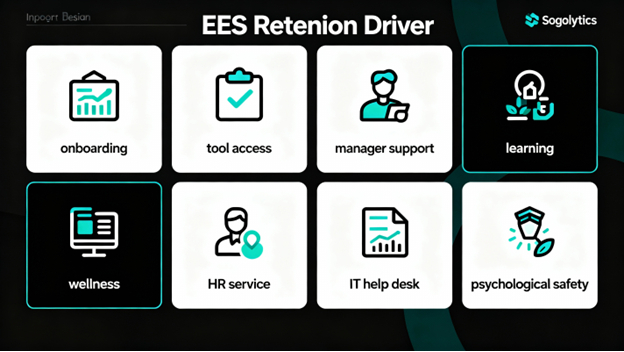
- 11 Onboarding Clarity (EES),First Impressions Count
Primary Prompt: “How clear was your first-week setup? (1–5)”
Follow-Up: “What instructions were missing? Which step confused you?”
Channel: In-app or email, end of week one
Why It Works: Poor onboarding costs time and erodes confidence. New hires who are confused after week one are already thinking about their backup plan. Early clarity compounds, it sets the tone for engagement and retention.
- 12 Tool & System Access (EES),Remove the Invisible Friction
Primary Prompt: “How easy was it to get access to required tools? (Very easy / Easy / Hard / Very hard)”
Follow-Up: “Which request stalled? How long did it take?”
Channel: Email or HR self-service portal, post-onboarding
Why It Works: Friction here delays productivity and frustrates new hires. Tracking access times reveals IT and HR bottlenecks. A financial services firm discovered that VPN access was taking 7 days. They automated it. New hire productivity (on day 1) jumped 40%.
- 13 Manager Support & Clarity (EES + Relationship),The #1 Predictor of Retention
Primary Prompt: “How supported do you feel by your manager? (1–5)”
Follow-Up: “What would help most? (Clearer goals / More feedback / Autonomy / Flexibility / Career pathing)”
Channel: Anonymous pulse, monthly
Why It Works: Manager quality is the #1 driver of retention. Period. Regular pulses on this metric signal burnout and retention risk early. A tech company that implemented monthly manager-support pulses caught 8 flight-risk employees and retained 7 of them through targeted manager coaching.
- 14 Learning & Career Growth (Engagement),The Unmet Need Nobody Talks About
Primary Prompt: “Do you have resources to grow in your role? (Yes / Somewhat / No)”
Follow-Up: “What’s missing? (Training / Time / Budget / Mentorship / Role clarity)”
Channel: Annual survey, mid-year check-in
Why It Works: Growth is a primary driver of engagement, especially for high performers. Gaps here predict attrition. Your best people will leave if they feel stuck. One consulting firm used this prompt to discover that 45% of high performers felt no growth opportunity. After launching a mentorship program, retention improved by 18%.
- 15 Wellness & Benefit Accessibility (EES),The Paradox
Primary Prompt: “Are wellness benefits easy to use? (1–5)”
Follow-Up: “Where’s the friction? (Too many options / Hard to enroll / Poor communication / Unfamiliar process / Privacy concerns)”
Channel: Email, quarterly
Why It Works: Here’s the paradox: companies spend 10K+ per employee on benefits that nobody uses because they’re too hard to access. This prompt measures actual usability, not just offering. A healthcare org discovered that 60% of employees didn’t know about mental health resources, just better communication (3 emails over 2 weeks) increased utilization by 40%.
- 16 HR Service Ease (EES),Speed Up the Bureaucracy
Primary Prompt: “How easy was it to resolve your HR request? (1–5)”
Follow-Up: “What slowed it down? Would a self-service portal help?”
Channel: Email post-HR interaction
Why It Works: HR is a service function. Friction here shows whether HR is enabling or creating delays. One multinational implemented a self-service benefits portal after discovering that 70% of HR interactions were simple benefits questions. Support tickets dropped 60%, and employees were happier.
- 17 IT Help Desk Responsiveness (EES),ProductivityKiller or Enabler?
Primary Prompt: “How easy was IT to work with? (1–5)”
Follow-Up: “Which step felt complex? How long did resolution take?”
Channel: Ticketing system auto-survey
Why It Works: IT downtime = employee downtime = lost productivity and frustration. A financial services firm discovered that IT resolution times ranged from 2 hours to 5 days depending on the category. By prioritizing high-impact issues, they cut average resolution time by 60% and improved IT satisfaction scores by 25 points.
- 18 Psychological Safety (Trust + Engagement),The Silent Culture Metric
Primary Prompt: “Do you feel safe sharing candid feedback? (1–5)”
Follow-Up: “What would help? (Anonymity / Leadership changes / Examples of action on feedback / Better listening)”
Channel: Anonymous pulse, quarterly
Why It Works: Psychological safety enables honest feedback, and honest feedback drives innovation and fixes culture problems. Low scores signal a leadership or culture issue that will stunt growth and increase attrition. A startup implemented quarterly psychological safety pulses and discovered that only 3 of 10 departments felt safe sharing feedback. Targeted leadership coaching in those departments improved retention by 22% within a year.
Product & SaaS Prompts: Activation, Aha Moments & Growth
Let’s talk about the prompts that actually predict revenue.
AI surveys for SaaS live in-app and in-moment. They’re triggered by behavior, signup completion, first feature use, billing updates, and designed to uncover friction, validate assumptions, and predict churn before it happens.
Here are 8 product-focused prompts that separate winners from everyone else:
- 19. First-Run Friction (Activation),Catch Them Before They Leave
Primary Prompt: “What almost stopped you from completing setup?”
Follow-Up: (If answered) “What would have helped you push through? Should we simplify this step?”
Channel: In-app modal, during or immediately post-setup
Why It Works: Friction here predicts abandonment. This prompt surfaces roadblocks in real-time, enabling immediate fixes. A project management SaaS discovered that 40% of users almost abandoned setup at the “integrate with Slack” step. Simplifying it to one click cut abandonment by 30%.
- 20. Aha Moment Discovery (Engagement),The Fastest Path to Value
Primary Prompt: “When did the product first feel valuable? What triggered it?”
Follow-Up: “Which feature made the difference? How can we get other users there faster?”
Channel: In-app, 7–14 days post-signup or post-key-event
Why It Works: Understanding aha moments lets you compress time-to-value for new users. Users who hit aha moments within 7 days have 60%+ better retention than those who take 30 days. A CRM platform learned that aha moment was “first successful contact sync”, so they made it step 3 of onboarding instead of step 12. CAC payback period dropped from 8 months to 4 months.
- 21. Documentation Helpfulness (Self-Service),Turn DocsInto Retention
Primary Prompt: “Were docs helpful? (Yes / Somewhat / No)”
Follow-Up: “Which page needs improvement? What info did you have to search elsewhere for?”
Channel: Email post-support-ticket or in-app after doc view
Why It Works: Docs reduce support load when done right, and good docs reduce churn. This prompt reveals gaps. A developer tool company discovered that their API docs were missing authentication examples. Adding them cut support requests by 25% and improved retention by 8%.
- 22. Feature Prioritization (Roadmap),Build What Matters
Primary Prompt: “Which feature matters most right now? (Open-ended list)”
Follow-Up: “Why this one? How would it change your workflow? How urgent is it?”
Channel: In-app, quarterly or post-update
Why It Works: Direct feedback on priorities beats backlog guessing. One productivity app learned that users ranked “offline mode” as #1 priority (ahead of team collaboration features). After shipping offline mode, churn dropped 15% and NPS jumped 12 points.
- 23. Usability & Task Completion (UX),The Daily Friction Killer
Primary Prompt: “How easy is it to complete your top task? (1–5)”
Follow-Up: “Which step is clunky? What would streamline it?”
Channel: In-app, post-task-completion
Why It Works: Ease predicts engagement and retention. This prompt names specific UX pain points. An analytics platform discovered that users spent 4x longer on the “export report” task than expected. Simplifying the export modal cut report generation time by 60% and increased weekly active users by 18%.
- 24. Release Retrospective (Product Performance),Learn Fast
Primary Prompt: “How satisfied are you with the latest update? (1–5)”
Follow-Up: “What should we fix first? (Bugs / UX / Performance / Missing features / Breaks my workflow)”
Channel: Email post-release or in-app banner
Why It Works: Immediate feedback on releases guides hotfixes and next priorities. It also validates assumptions. A design tool shipped a major UI redesign based on user requests, but 55% of users hated it. Quick feedback meant they reverted within 48 hours (and saved their reputation).
- 25. Pricing Fairness & Fit (Monetization),The Upgrade & Churn Signal
Primary Prompt: “How fair is current pricing? (Very fair / Fair / Unfair / Very unfair)”
Follow-Up: “Which tier fits best and why? What would change your answer?”
Channel: Email, quarterly or pre-renewal
Why It Works: Pricing perception drives both acquisition and retention. Users who feel overcharged have 3x higher churn risk. One SaaS platform discovered that “mid-market” customers felt squeezed between two tiers. They added a mid-market tier, and annual churn dropped from 15% to 8%.
- 26. Churn Risk & Win-Back (Retention),Your Last Chance to Act
Primary Prompt: “What would cause you to cancel? (Open-ended)”
Follow-Up: “What would change your mind? (Better features / Lower cost / Improved support / Integration / Competitive alternative)”
Channel: In-app or email, quarterly (especially for at-risk segments)
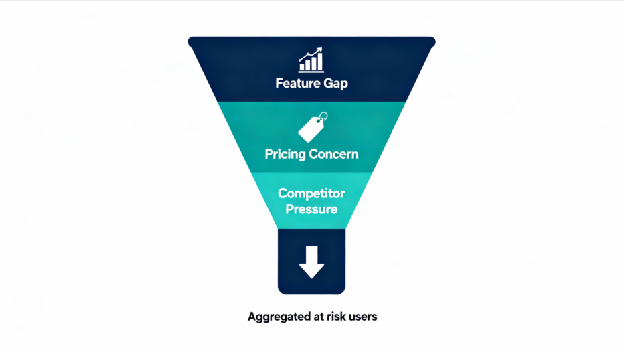
Why It Works: Proactive churn surveys let you intervene. The follow-up reveals what could save the customer. A financial software company learned that churn drivers split into three buckets: 40% feature gaps, 35% pricing, 25% competitive pressure. They addressed feature gaps first (highest ROI) and saved 22% of at-risk customers.
Pro Tip: Tag churn-risk responses by severity (feature gap vs. budget constraint vs. competitor comparison). Route high-risk responses to sales or success immediately, same day if possible. Speed matters. A company that responds to churn signals within 24 hours retains 40% more at-risk customers than those that respond in 5+ days.
Healthcare Prompts: Empathy, Clarity & Compliance
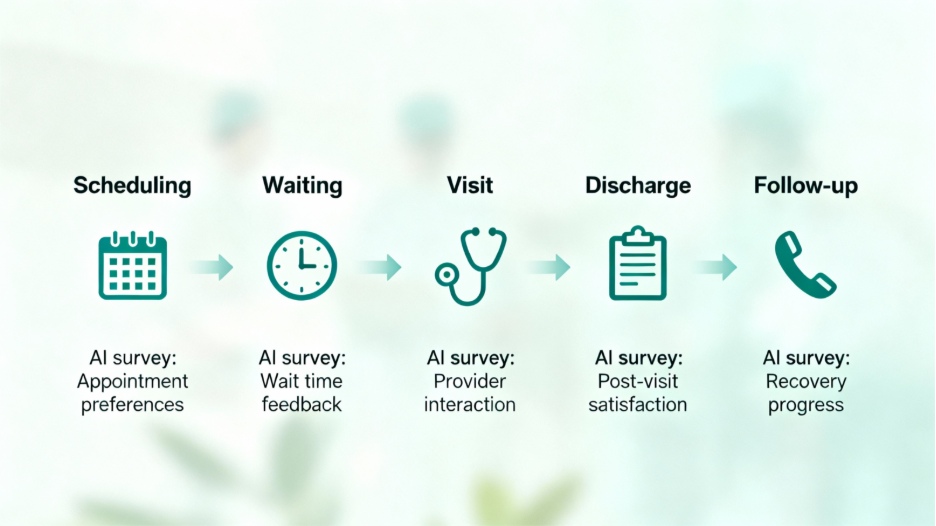
Healthcare surveys are different. Patients are vulnerable, often stressed, and frequently unfamiliar with medical language. AI healthcare survey questions must balance empathy, clarity, and privacy, while building trust in AI-assisted care.
Here are 8 healthcare-specific prompts designed with both patient outcomes and compliance in mind:
- 27. Access to Care (CES),The Foundation of Trust
Primary Prompt: “How easy was it to schedule your appointment?”
Follow-Up: “Was the website/phone clear? What would improve it?”
Channel: SMS post-scheduling or in-app
Why It Works: Access barriers prevent care. This prompt measures whether booking is frictionless or a roadblock. A clinic discovered that 60% of callers abandoned scheduling after 3+ menu options on phone. Simplifying to “Press 1 to Schedule” cut abandonment by 45%.
- 28. Wait Time Acceptability (CSAT + Operations),Respect the Patient’s Time
Primary Prompt: “Was the wait time acceptable? (Yes / No / Somewhat)”
Follow-Up: “What would improve it? (Online queue / Real-time updates / Shorter wait options / Clearer communication)”
Channel: Email post-visit or SMS
Why It Works: Wait times erode trust and overwhelm staff. Feedback here identifies whether communication, staffing, or scheduling is the issue. A hospital’s average wait time was 45 minutes, but they perceived it as 70 minutes because no one knew where they were in the queue. Adding SMS updates cut perceived wait time to 35 minutes, and complaints dropped 40%.
- 29. Communication Clarity (Compliance + Patient Safety),The Critical Metric
Primary Prompt: “Were instructions easy to understand? (1–5)”
Follow-Up: “Where were gaps? (Medical jargon / Too much info / Missing visuals / Too fast / Written vs. spoken)”
Channel: Email post-discharge or in-app
Why It Works: Unclear instructions lead to patient harm, readmission, and liability. This prompt catches comprehension gaps before the patient leaves, enabling real-time clarification. A hospital discovered that only 40% of patients understood discharge instructions on first explanation. Training providers to use simpler language and visual aids improved patient comprehension to 82%.
- 30. Bedside Empathy & Respect (CSAT + Trust),Build Lasting Relationships
Primary Prompt: “Did you feel heard and respected? (Yes / Somewhat / No)”
Follow-Up: “What would have helped? (More time / Less judgment / Better listening / Validation of concerns)”
Channel: Email, post-visit
Why It Works: Trust in care providers predicts adherence and satisfaction. Low scores signal training or burnout issues. A clinic implemented quarterly empathy surveys and discovered that burnout correlated directly with patient scores. Addressing provider burnout (shorter shifts, better staffing) improved patient satisfaction by 18 points.
- 31. Discharge Clarity & Follow-Up (Patient Safety + CES),Prevent Readmission
Primary Prompt: “Are follow-up steps clear? (Yes / Somewhat / No)”
Follow-Up: “What needs clarification? (Medications / Activity level / When to return / Warning signs / Who to contact)”
Channel: SMS or email, immediately post-discharge
Why It Works: Clear discharge instructions reduce readmission by 15–20% and improve outcomes. This prompt catches confusion before the patient leaves. A hospital system used this and learned that 35% of patients didn’t understand medication changes. Adding a visual medication card (printed and emailed) improved readmission rates by 12%.
- 32. Follow-Up Appointment Convenience (Access),Close the Loop
Primary Prompt: “How easy was it to arrange follow-ups? (1–5)”
Follow-Up: “What’s your preferred channel? (Phone / Text / In-app / Online portal / Email)”
Channel: Email or SMS, post-discharge
Why It Works: Friction here causes missed appointments and continuity gaps. Channel preference data enables smarter outreach. A clinic discovered that 70% of patients preferred text reminders, but they were sending email reminders. Switching to text-first reduced no-shows by 22%.
- 33. Informed Consent Clarity (Compliance),Legal Protection + Ethical Care
Primary Prompt: “Was consent information clear? (Yes / Somewhat / No)”
Follow-Up: “What phrasing felt confusing? (Medical terms / Process / Rights / Risks / Side effects)”
Channel: Email post-consent or in-app
Why It Works: Unclear consent opens legal and ethical risks. This prompt validates comprehension and flags language issues. A hospital discovered that 45% of patients didn’t understand they could decline treatment. Simplifying consent language improved comprehension to 89% and reduced legal exposure.
- 34. Trust in AI-Assisted Care (Emerging + Transparency),Build Confidence in New Tech
Primary Prompt: “Are you comfortable with AI-assisted care notes? (Yes / Somewhat / No)”
Follow-Up: “What concerns do you have? (Accuracy / Privacy / Human oversight / Control / Data use)”
Channel: Email, pre-implementation or post-first-use
Why It Works: Transparency builds trust. This prompt surfaces patient concerns early, guiding implementation and communication strategy. A health system that communicated “AI flags for review by human doctors” saw 78% patient approval, vs. 45% approval when they just said “AI-assisted notes” without context.
Pro Tip: Use plain language, avoid acronyms, and offer open-ended options. Healthcare patients appreciate clarity and control, and they’ll tell you exactly what works. Plain language guidelines: Flesch–Kincaid Grade 6–8, short sentences (15 words or fewer), avoid multi-syllabic medical terms without explanation.
How to Deploy These Prompts: The Action Plan
You’ve got the prompts. Now comes the part that actually drives results: deployment.
Here’s the exact playbook:
- Copy the prompt that matches your use case, customer segment, and KPI.
- Personalize the tone, terminology, and follow-ups to match your brand and audience. (“Satisfaction” vs. “happiness” matters.)
- Pick the channel in-app for immediate feedback, email for relationship moments, SMS for quick pulses, phone for high-value or sensitive interactions.
- Set timing post-interaction for CSAT/CES (within 15 minutes), milestone moments for NPS (post-renewal, post-support), regular pulses for trend tracking (weekly or monthly).
- Add dynamic logic if-then follow-ups based on score or response. Higher scores get “what should we do more of?” Lower scores get “what went wrong?”
- Route & alert score ≤ 3? Route to manager same-day. Churn-risk keyword detected? Alert sales within 1 hour. Automation + speed = better outcomes.
- Measure & iterate track response rates, sentiment, and correlation to retention/revenue by segment and channel. Adjust language and cadence based on results. What works for SMBs might not work for Enterprise.
To put this playbook into action, start in Sogolytics’ Create with AI experience. From there, you can describe your goal, audience, and KPI, then instantly generate a survey framework that applies these prompts, logic, and timing recommendations, so you’re deploying insight-ready surveys in minutes, not building everything manually.
The Real ROI: What You Should Expect
Here’s what happens when you go from generic questions to engineered prompts:
- Response rates: +45–60% (from 15% average to 40–50%)
- Time-to-insight: −60% (from weeks to days)
- Churn detection: +85% earlier (catch issues pre-churner, not post-churner)
- NPS scores: +8–15 points within 6 months (from better retention)
- Support efficiency: −30–40% support tickets (from better proactive intervention)
- Product velocity: +40% faster feature decisions (from segmented, prioritized feedback)
One Sogolytics customer, The Center for Client Retention (TCFCR), saw a significant shift in how quickly they could act on feedback once they moved to real-time survey analytics. By setting up automated triggers for low satisfaction or NPS responses and immediately routing follow-ups, they were able to address issues before they escalated, reducing friction and strengthening loyalty.
Instead of waiting weeks to compile survey results, their teams could act on insights within hours, improving both retention and the quality of client relationships. That operational change alone helped them turn feedback into measurable improvements in customer satisfaction and loyalty.
Stop Asking. Start Listening.
Your competitors are still asking “On a scale of 1–10, how satisfied are you?” and wondering why nobody responds.
You’re going to ask the right questions, at the right time, in the right way.
You’re going to catch churn before it happens. You’re going to identify product-market fit before your competitor does. You’re going to know exactly what to build, who to hire, and where to invest.
That’s the power of AI-engineered survey prompts.
Start with metrics and moments that matter to your business. Tailor prompts by segment and channel. Use smart follow-ups to capture context that turns feedback into decisions fast. Then localize the tone, protect privacy, and enable real-time routing so the right teams act before the window closes.
Iterate on prompt performance by channel and segment. Fold insights into roadmaps, enablement, and journey design. Measure correlation between prompt results and revenue outcomes.
Ready to stop guessing and start listening for real? Request a demo today and watch your data finally start working for you.
FAQs
Q1. What makes an effective AI survey prompt, and how do dynamic follow-ups improve response quality and depth for CX, EX, and product programs?
A: Strong prompts define role, goal, audience, constraints, and success metrics upfront. Dynamic follow-ups, triggered by score or response, uncover why behind every answer, cutting analysis time by 40%+ and boosting actionability. They also increase response completion rates by 30–45% because respondents feel heard.
Q2. Which prompts best map to CSAT, CES, NPS, and EES when designing scalable CX and EX programs across touchpoints and channels?
A: CSAT measures satisfaction post-interaction (post-support, post-visit). CES measures ease (support resolution, onboarding, HR service). NPS measures loyalty and advocacy (monthly or post-milestone). EES measures employee effort (monthly pulse). Map one metric per survey to keep focus and ensure comparison over time.
Q3. How should healthcare prompts balance empathy, clarity, and privacy, while maintaining consent transparency and avoiding sensitive free-text content?
A: Use Flesch–Kincaid Grade 6–8 language, avoid jargon, and offer structured response options (yes/no, multiple choice) for sensitive topics. Sensitive free-text (symptoms, mental health) should be encrypted and flagged for clinical review only. Always state data use and confidentiality upfront in plain language.
Q4. What’s the best way to personalize prompts by segment and channel without sacrificing trend comparability and benchmarking over time?
A: Keep the core question identical across segments and channels for benchmarking. Personalize tone, terminology, and follow-ups. Track response rates, sentiment, and KPI correlation by segment, variations reveal what works. Use tag-based analysis to segment drivers and isolate root causes.