




Quick Summary
- Focus your journey map on a single persona, clear goals, and the touchpoints that most impact conversion or retention.
- Assign clear ownership for each stage so insights turn into real improvements rather than one-off documentation.
- Use multi-source customer data to validate pain points and prioritize fixes with the highest ROI.
- Keep maps simple, visual, and regularly updated so teams can act quickly and improve the experience continuously.
If we’re talking about big-picture concepts like the human condition, it’s the former. If we’re thinking on a small scale, like getting home after a long day of work, it’s the latter.
If we’re considering customers interacting with your brand and ultimately making a purchase, however, it’s both. Data from Salesforce found that 80% of customers now consider the experience a company provides to be as important as its products or services. As a result, companies must understand the impact of every touchpoint, from initial contact to content engagement, product consideration, and sales conversion.
The business case is clear: companies with journey management programs see 54% greater return on marketing investment and 56% more cross-sell and up-sell revenue, according to Aberdeen Group research.
Customer journey maps are critical in this process.
Journey maps visually represent the customer experience, touchpoint by touchpoint. These maps align teams around customer goals, pain points, and moments that matter across all stages of the consumer lifecycle. Strong maps include customer personas, stages, touchpoints, emotions, pain points, and success metrics that enable both clarity and actionability.
In this piece, we’ll explore journey mapping basics and offer 10 examples to help showcase maps in action. Then, we’ll deliver a repeatable framework and practical guidance to help prioritize efforts that move customer experience (CX) metrics.
What Is Customer Journey Mapping?
Journey maps for customers have only two hard-and-fast rules:
1) They must be visual — something that teams can see.
2) They must be understandable. If maps require long-winded explanation or accompanying documentation, they’re too complex.
Visual and understandable, however, don’t guarantee insight. Successful journey maps share three components:
Clear scope and goals
Scope defines the journey itself: Are you looking to measure the customer journey from end-to-end, or create a micro-journey map that examines consumer experiences with a specific part of the process, such as initial engagement or the purchase process? Scope also speaks to persona. Choose a single customer type to track, rather than trying to compile data on multiple buyer preferences.
Goals are what you hope to gain. For example, are you looking to measure engagement rates? Website interactions? The timeline for initial purchases or the likelihood of repeat purchases? By ensuring your scope and your goals align, you can improve the accuracy of mapping outcomes.
Multi-source data gathering
While data from a single source helps provide point-in-time insight, using multiple sources offers context. Start by taking inventory of your channels and touchpoints, then carry out surveys and interviews, and combine these results with transaction, customer service, and social media data to get the big picture.
Well-defined stages, metrics, and ownership
Great maps don’t happen by accident. Clearly define the stages of your customer journey and identify possible friction points in the collection and analytics process. Then, pinpoint metrics that matter, decide who “owns” the process to ensure accountability, and set a specific cadence for map reviews to ensure they remain actionable.
Types of Customer Journey Maps
Not all journey maps serve the same purpose. The type you choose depends on whether you’re diagnosing an existing experience, designing a future one, or understanding the broader context of your customer’s life. Here are the four most common types and when to use each.
Current-State Journey Maps
Current-state maps visualize how customers interact with your business right now. They document real behaviors, emotions, and pain points at each touchpoint based on actual data — surveys, support logs, analytics, and interviews. Think of a current-state map as taking an inventory before making changes. Use them to diagnose where customers drop off, feel frustrated, or encounter service gaps. Most of the examples in this post — including Spotify, Starbucks, the VA, and IKEA — are current-state maps.
Future-State Journey Maps
Future-state maps project how you want customers to interact with your brand after planned improvements. They’re aspirational — built using insights from current-state maps combined with your strategic goals. Instead of documenting what is, they define what should be. Teams use them to align around a shared vision of the ideal customer experience before investing in changes. Best for product launches, redesigns, service overhauls, or strategic pivots where you’re building a new experience from scratch.
Day-in-the-Life Journey Maps
Day-in-the-life maps capture a customer’s entire daily routine — including activities unrelated to your brand. They reveal unmet needs and contextual pain points you’d miss by only looking at direct interactions. For example, the Netflix map in this post tracks what happens when a user bypasses recommendations entirely and opts for manual search — behavior that only surfaces when you look at the broader context of how they spend their time. Best for understanding customer context, finding new product opportunities, and improving retention through relevance.
Service Blueprints
Service blueprints extend journey maps by adding a “backstage” layer — the internal processes, systems, and people that support each customer-facing touchpoint. They show what happens behind the scenes to deliver the experience. Use them when you need cross-functional alignment between CX, operations, IT, and support teams. The IKEA example in this post functions partly as a service blueprint, mapping stock-picking and delivery logistics alongside the customer’s in-store experience. Best for complex service environments like healthcare, financial services, and enterprise SaaS.
10 Customer Journey Map Examples From Top Brands
The journey map that works best for you depends on your industry, customer pain points, and channel mix. But this doesn’t mean you need to reinvent the wheel — here are 10 journey map examples to help get you started.
| # | Brand | Map Type | Industry | Key Takeaway |
| 1 | Spotify | Current-State | B2C / Entertainment / SaaS | Focus on a single persona and single goal for actionable insights. |
| 2 | HubSpot | Current-State | B2B / SaaS | Color-code positive vs. friction experiences. Add real customer quotes. |
| 3 | Intuit | Future-State | B2C / FinTech | Use future-state maps for product launches to catch friction before it ships. |
| 4 | Amazon | Current-State | B2C / Ecommerce | Map the purchase stage in micro-steps — most drop-offs happen here. |
| 5 | Netflix | Day-in-the-Life | B2C / Entertainment / SaaS | Map what customers actually do, not just the path you designed. |
| 6 | Starbucks | Current-State | B2C / Retail / F&B | Post-purchase reflection decides loyalty. Map beyond the transaction. |
| 7 | VA | Service Blueprint | Healthcare / Government | Uncertainty causes more frustration than the problem itself. Set expectations. |
| 8 | Rail Europe | Current-State | B2C / Travel | Layer qualitative insights on top of quantitative data for the full picture. |
| 9 | Lancôme | Current-State | B2C / Retail / Beauty | Span all channels — the journey doesn’t reset when customers switch. |
| 10 | IKEA | Current-State | B2C / Retail / Omnichannel | Pain points often hide in post-purchase. Let data guide where you invest. |
1) Spotify
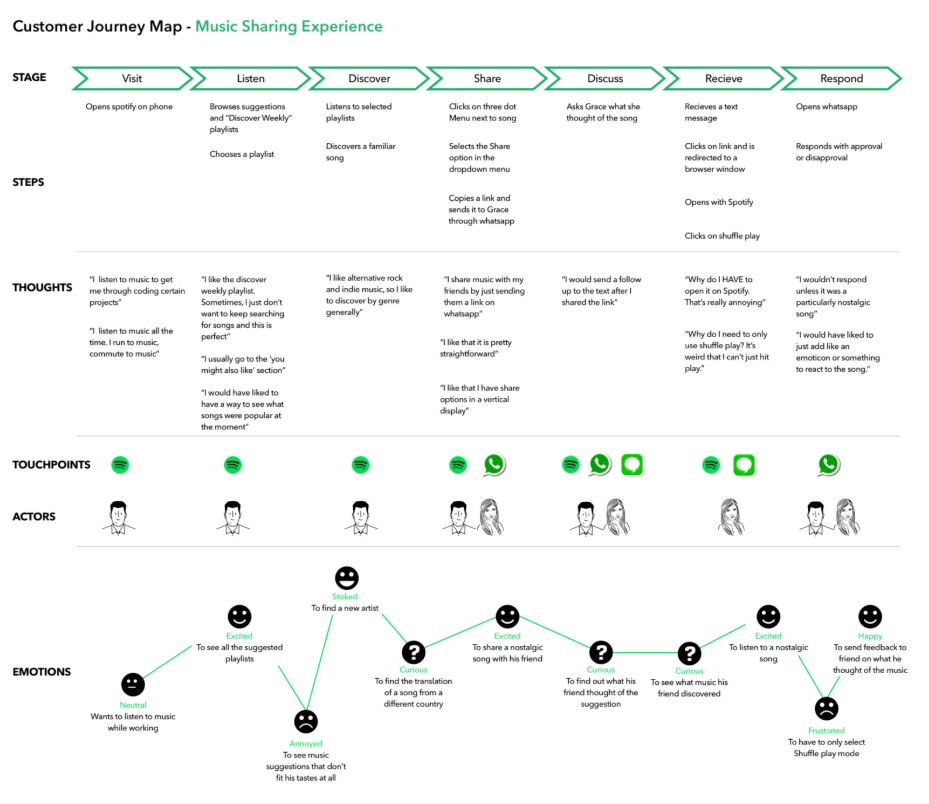
Map Type: Current-State B2C Journey Map
Spotify created this journey map to understand how listeners discover, share, and engage with music through its platform. The map tracks the full experience from song discovery through playlist creation to social sharing.
What makes it effective: Spotify didn’t just map the steps — they captured the emotional arc, identifying moments of delight (finding a perfect song) and friction (clunky sharing flows that interrupted the listening experience).
Key takeaway: Notice how the map focuses on a single persona and a single goal (sharing music). This focus is what makes it actionable — it’s easier to fix one specific flow than to optimize everything at once.
Industry: B2C / Entertainment / SaaS
2) HubSpot

Map Type: Current-State B2B SaaS Journey Map
HubSpot’s color-coded journey map tracks how B2B buyers move from awareness through evaluation to becoming active CRM users. The use of real user testimonials alongside journey stages adds qualitative depth that most maps lack.
What makes it effective: The color-coding system visually separates positive experiences from friction points, making it immediately clear where the journey breaks down. Including actual customer quotes grounds the map in real experience rather than assumptions.
Key takeaway: For B2B companies with long sales cycles, including direct customer testimonials in your map adds credibility and helps cross-functional teams empathize with real buyer frustrations. This is one of the strongest B2B customer journey map examples in our list.
Industry: B2B / SaaS
3) Intuit
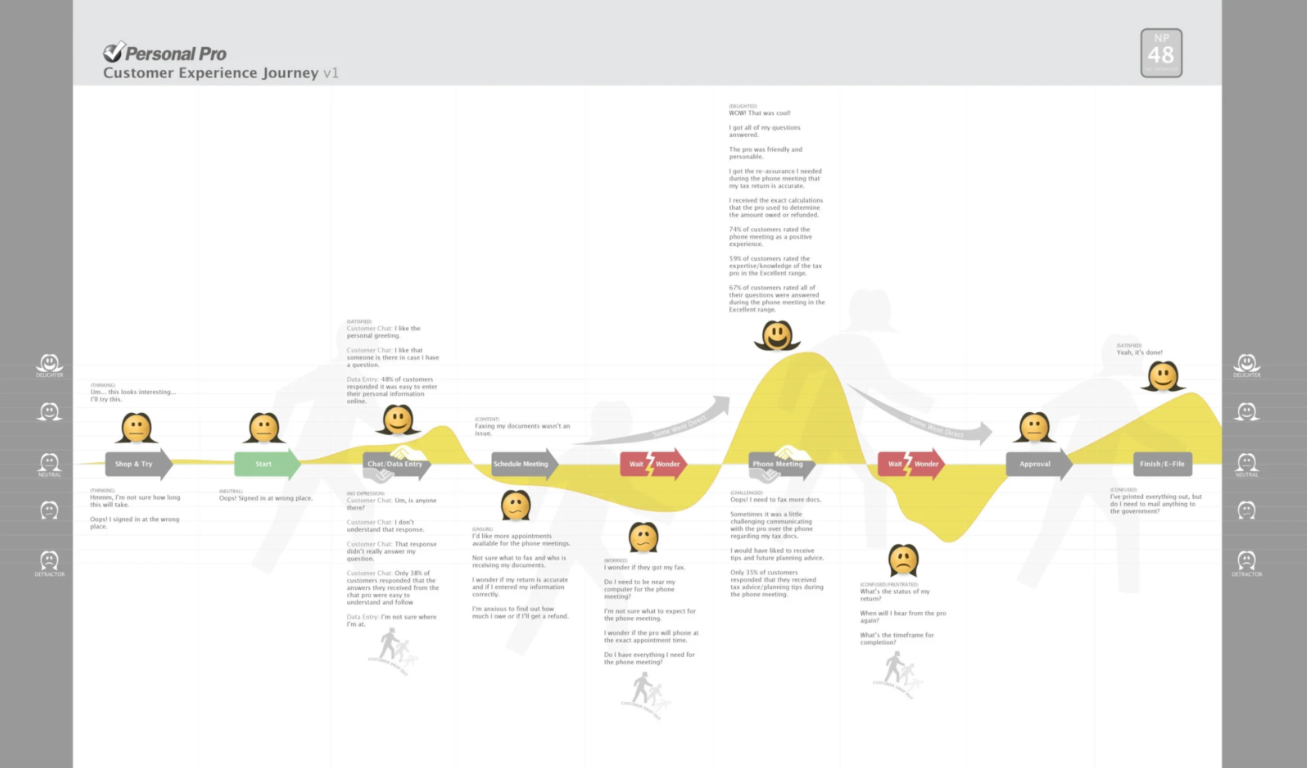
Map Type: Future-State B2C Journey Map (Product Launch)
Intuit built this map specifically to gauge customer response to Personal Pro, a new TurboTax offering. Rather than documenting the existing experience, this map projected how customers should interact with the new product from first awareness through onboarding and regular use.
What makes it effective: Using a journey map for a product launch forced the team to anticipate friction before it happened — catching potential pain points while they were still cheap to fix, rather than discovering them post-launch.
Key takeaway: Future-state maps are especially valuable for product launches. They help you design the experience before you build it, aligning the entire team around a shared vision of what the customer journey should look like from day one.
Industry: B2C / FinTech
4) Amazon

Map Type: Current-State B2C Ecommerce Journey Map
Amazon’s journey map tracks the full buyer experience from initial product search through purchase, delivery, and post-purchase review. The map is notable for its granularity — it breaks the purchase stage into micro-steps, including search, filtering, reading reviews, comparing prices, and checkout.
What makes it effective: Amazon identifies emotional shifts at each micro-step. A customer might feel confident during the search but anxious at checkout if shipping costs are unclear. Mapping these shifts helps prioritize which friction points to fix first based on revenue impact.
Key takeaway: For ecommerce brands, map the purchase stage in more detail than other stages — this is where most drop-offs happen, and small friction points have outsized revenue impact.
Industry: B2C / Ecommerce
5) Netflix
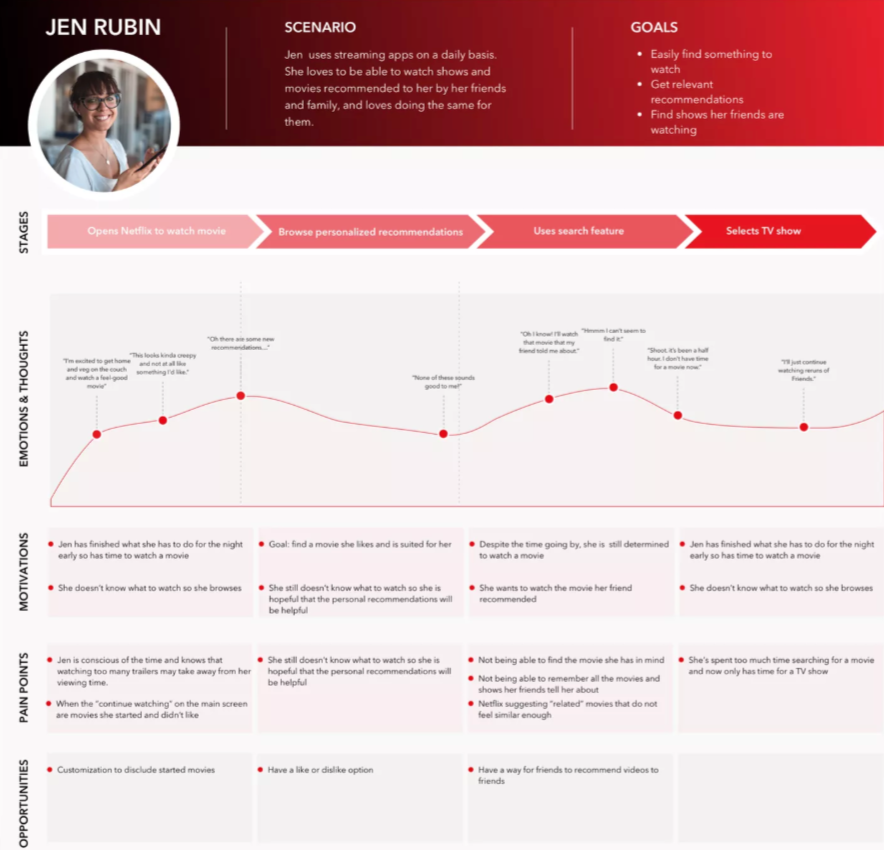
Map Type: Day-in-the-Life B2C Journey Map
Netflix’s map uses “Jen,” a fictional persona built from real user data, to explore what happens when customers deviate from expected behavior. Instead of following Netflix’s recommendations, Jen opts for manual search — revealing friction in the search algorithm that standard analytics might miss.
What makes it effective: By mapping an unexpected path rather than the ideal one, Netflix uncovered issues that traditional funnel analysis would never surface. The persona-based approach made the insights relatable and actionable for the product team.
Key takeaway: Don’t just map the journey you designed. Map what customers actually do — especially when they deviate from your expectations. Those deviations are where the biggest insights live.
Industry: B2C / Entertainment / SaaS
6) Starbucks
Map Type: Current-State B2C Retail Journey Map
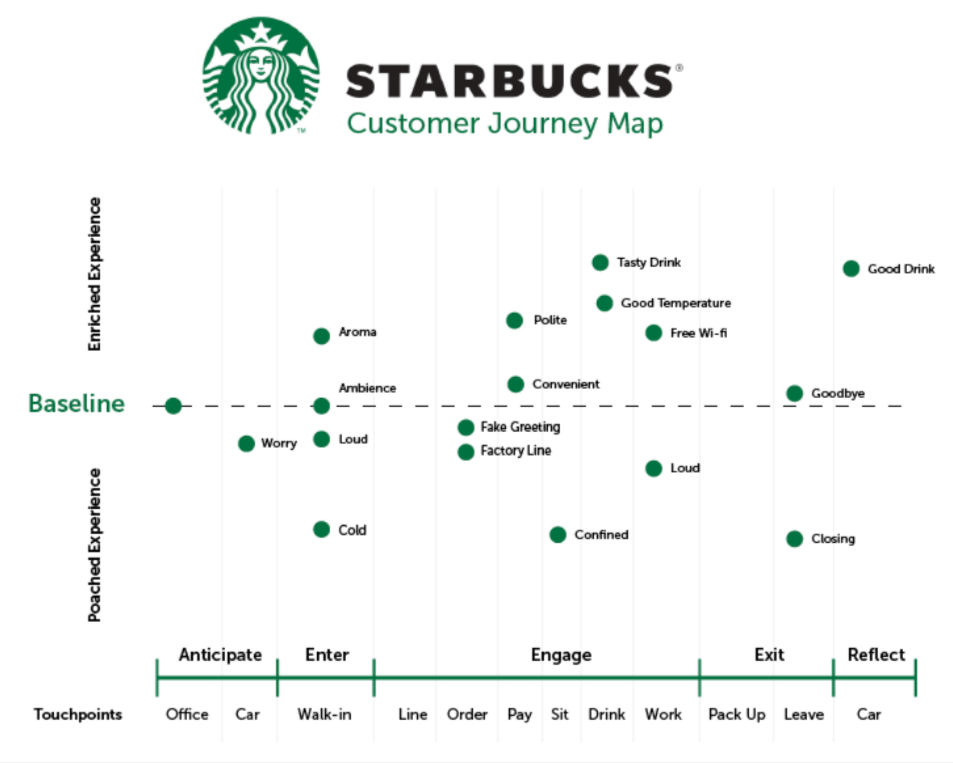
Starbucks mapped the journey of a repeat customer across multiple touchpoints: arrival, ordering, waiting, receiving the drink, the in-store experience, departure, and post-visit reflection. The map captures what happens both inside and outside the store walls.
What makes it effective: The map tracks emotional states at each micro-moment — the anticipation during ordering, potential frustration during wait times, and satisfaction (or disappointment) upon receiving the drink. This emotional layer reveals which moments have the biggest impact on repeat visits.
Key takeaway: For retail and food service brands, the post-purchase reflection stage matters as much as the purchase itself. That’s where customer loyalty and the decision to come back are decided.
Industry: B2C / Retail / Food & Beverage
7) The Department of Veterans Affairs
Map Type: Current-State Service Blueprint (Healthcare)
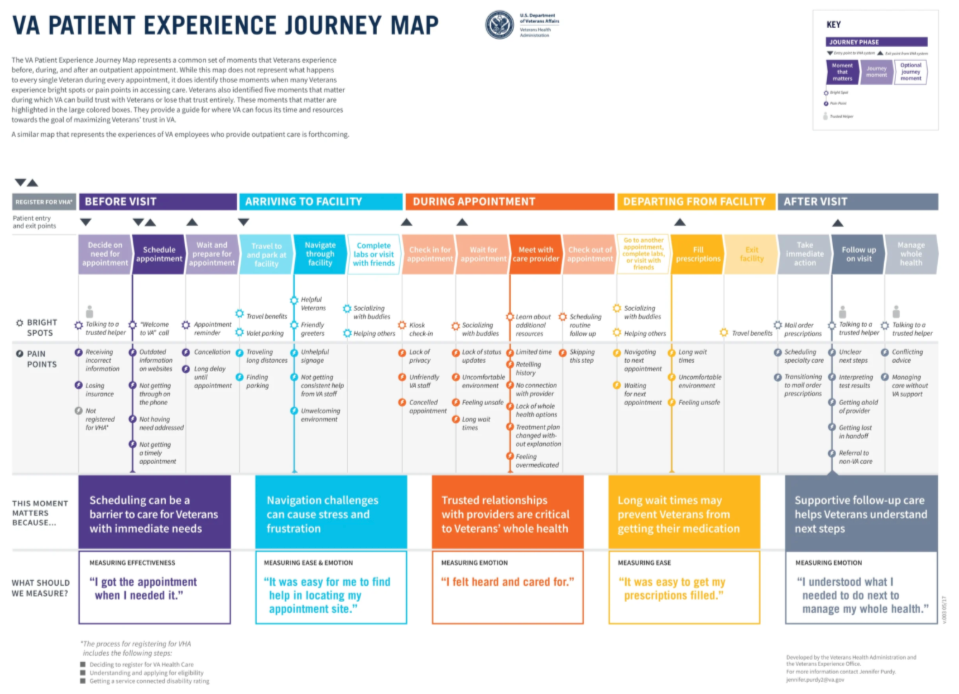
The VA created this journey map to visualize the full patient experience in VA hospitals — from scheduling an appointment through arrival, waiting, consultation, treatment, and follow-up. What sets it apart is the explicit tracking of emotions, thoughts, and pain points at every single stage.
What makes it effective: The waiting room stage revealed that uncertainty about wait times caused more frustration than the actual wait itself. This insight led to a clear, actionable fix: proactive wait-time updates that dramatically improved the patient experience without reducing actual wait durations.
Key takeaway: In healthcare and government contexts, mapping emotional states is critical because patients and citizens are often anxious and vulnerable. Small improvements — like setting expectations proactively — can dramatically shift the experience.
Industry: Healthcare / Government
8) Rail Europe
Map Type: Current-State B2C Travel Journey Map
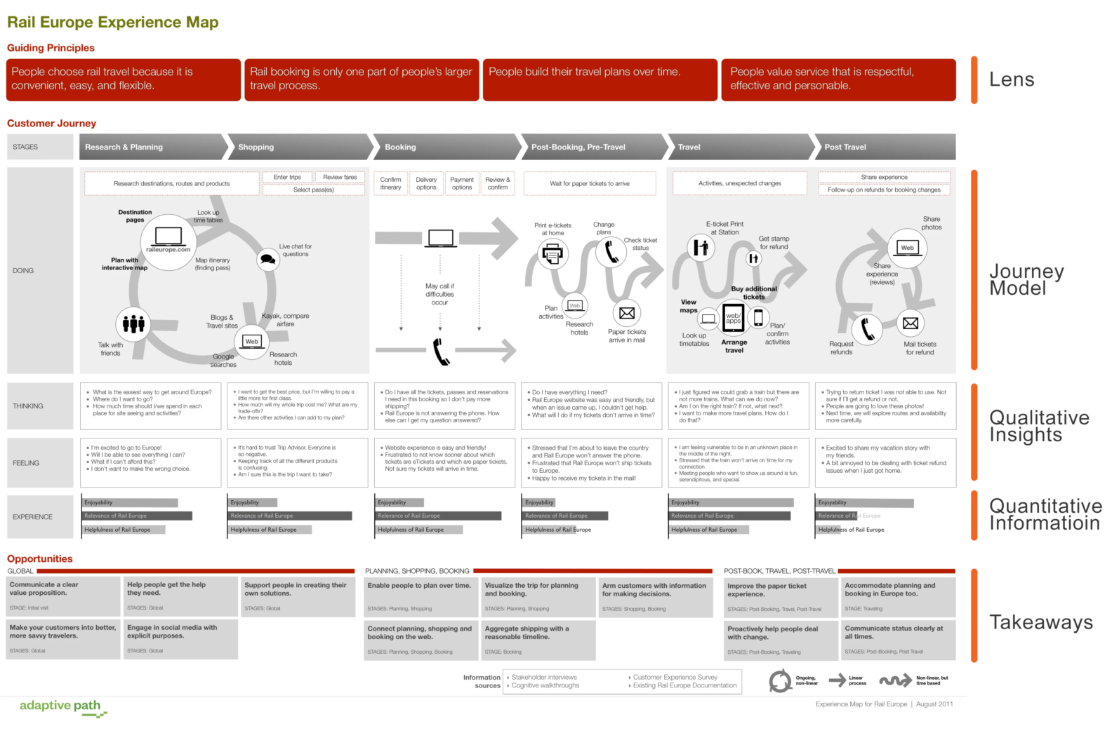
Rail Europe’s map tracks the traveler experience from trip planning through booking, the travel day itself, and post-trip reflection. The map focuses heavily on identifying pain points at each stage and pairing them with qualitative insights from real traveler feedback.
What makes it effective: By separating quantitative data (drop-off rates, booking completion percentages) from qualitative insights (traveler confusion about routes, anxiety about train connections), Rail Europe could address both the “what” and the “why” behind each friction point.
Key takeaway: Layer qualitative insights — from interviews, open-text survey responses, and support tickets — on top of your quantitative data. Numbers tell you where problems are; qualitative data tells you why they exist.
Industry: B2C / Travel
9) Lancome
Map Type: Current-State B2C Omnichannel Journey Map (Beauty/Retail)
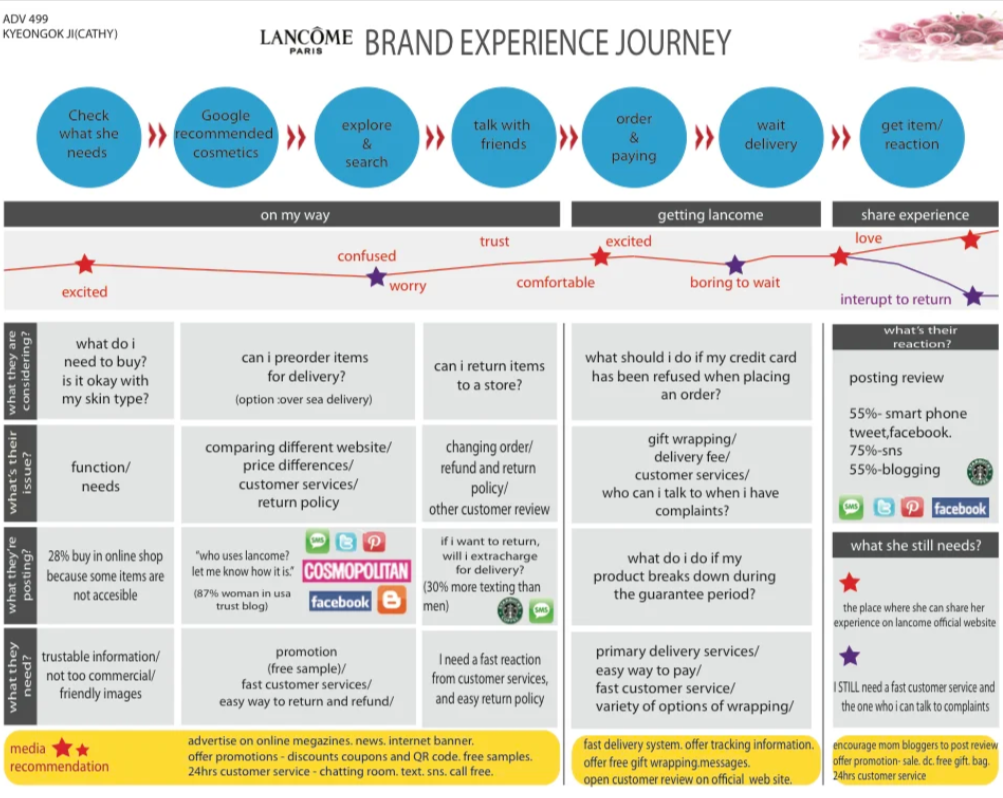
Lancôme’s map tracks all stages of customer interaction across both online and offline channels: from researching products online and considering purchases, to entering physical stores for consultations, making purchases, and leaving post-experience reviews that influence future buyers.
What makes it effective: The map captures the omnichannel reality of modern retail — customers research online but often buy in-store, and their post-purchase review behavior online creates a feedback loop that affects new customers entering the journey.
Key takeaway: For brands with both online and physical presence, your journey map must span all channels. A customer’s journey doesn’t reset when they switch from your website to your store — it’s one continuous experience.
Industry: B2C / Retail / Beauty
10) IKEA
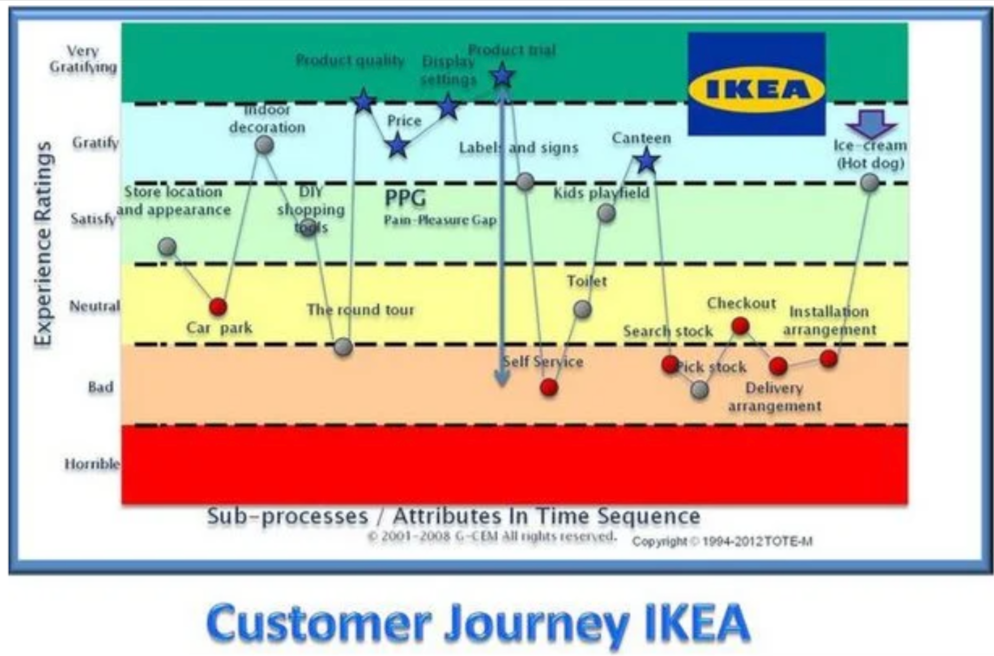
Map Type: Current-State Omnichannel Journey Map (Retail)
IKEA’s journey map tracks the customer experience across online and in-store channels — from browsing the catalog and planning a visit, through the in-store maze navigation, to stock-picking, checkout, delivery scheduling, and furniture assembly.
What makes it effective: IKEA identified that the biggest pain points weren’t in the store itself but in the post-purchase stages: delivery scheduling confusion and assembly frustration. This shifted their investment toward better delivery tracking and clearer assembly instructions.
Key takeaway: Don’t assume pain points cluster where you expect them. Map the full journey including post-purchase, and let data — not assumptions — guide where you invest your improvement budget.
Industry: B2C / Retail / Omnichannel
How to Build a Customer Journey Map Step by Step
To build your customer journey map, follow these Seven steps:
Step 1: Define Your Objective and Scope
Before mapping anything, define what you’re trying to learn. Are you mapping the full end-to-end customer journey or a specific micro-journey like onboarding, the purchase process, or support? Are you focused on reducing churn, increasing conversions, or improving satisfaction? Scope also means choosing a single buyer persona to track — mapping multiple customer types in one map creates noise. One focused map will always be more actionable than a broad one that tries to capture everything.
Step 2: Build Your Customer Persona
Define who you’re mapping for. Create a persona that includes demographics (role, industry, company size), goals (what they’re trying to achieve), pain points (what frustrates them), and preferred channels (how they interact with your brand). Use survey data, support tickets, and sales call notes to build this profile with real data, not assumptions. A single well-researched persona will produce a more useful map than trying to represent all customers at once.
Pro tip: Use VoC surveys to capture persona data directly from your customers. Tools like Sogolytics let you segment responses by role, industry, and satisfaction level to build data-backed personas.
Step 3: List All Touchpoints and Channels
Take inventory of every place a customer could interact with your brand: website, mobile app, email, social media, ads, sales calls, in-store visits, support tickets, chatbots, review sites, and word-of-mouth. Don’t limit yourself to owned channels — include third-party touchpoints like review platforms and comparison sites where customers form opinions about your brand. This list becomes the skeleton of your map. Missing even one key touchpoint means your map has a blind spot.
Step 4: Capture the Voice of the Customer
If you don’t listen to the VoC, your journey maps won’t offer useful directions. Capture VoC at key touchpoints with contextual surveys that measure customer satisfaction score (CSAT), net promoter score (NPS), and customer effort score (CES). Include open-text options to surface emotional drivers and qualitative insights that closed-ended questions miss.
Step 5: Map Stages and Plot the Emotional Arc
Lay out the five core customer journey stages: Awareness, Consideration, Decision, Retention, and Advocacy. Under each stage, place the touchpoints you identified in Step 3. Then add the emotional layer — for each stage, plot the customer’s emotional state on a scale from frustrated to delighted. Common emotions to track include confusion (during research), anxiety (during purchase or commitment), relief (after successful setup), frustration (during support interactions), and delight (during “wow” moments). Plotting this emotional arc visually — as a line graph overlaid on your journey stages — immediately reveals where your experience creates friction and where it exceeds expectations. Focus improvement efforts where the emotional line dips lowest.
Step 6: Identify Pain Points and Prioritize by ROI
Not all pain points are equal. Segment them by persona and channel, then rank by business impact. Which friction points cause the most drop-offs? Which ones generate the most support tickets? Which ones affect your highest-value customers? Focus improvement efforts where the emotional line dips lowest and the business impact is highest. This data-driven prioritization ensures you’re fixing what matters most, not just what’s easiest.
Step 7: Close the Loop — Assign Owners, Set Alerts, Iterate
Alerts and dashboards let you see what’s happening in real time, but they’re useless without accountability. Assign ownership across cross-functional teams — marketing, sales, product, and support should all have a stake in the journey. Set a review cadence (monthly or quarterly) and update maps whenever there is a significant change to your customer experience. Regularly gather feedback and track customer behavior changes over time to ensure maps stay current. Journey maps are living documents, not one-off artifacts.
Best Customer Journey Mapping Tools for 2026
The right tool depends on your team size, budget, and whether you need visualization, analytics, or both. Here are the most widely used options:
Miro — Best for collaborative workshops. Infinite canvas with pre-built journey map templates and real-time collaboration. Free tier available.
Smaply — Best for structured CX projects. Links personas, journey maps, and stakeholder maps in one workspace. Starts at €29/month.
UXPressia — Best for emotional mapping. Tracks customer feelings at each touchpoint with built-in analytics integration. Free plan available.
Lucidchart — Best for teams in Microsoft or Google ecosystems. Flowchart-style mapping with smart shapes and strong integrations.
Figma / FigJam — Best for design-led teams. Flexible whiteboard with real-time collaboration and extensive design capabilities.
Canva — Best for quick visual maps. Drag-and-drop templates that require no design skills.
Sogolytics — Best for data-driven mapping. Capture VoC data via CSAT, NPS, and CES surveys that feed directly into journey insights. Connect real customer feedback to every stage of your map.
For visualization-focused teams, Miro and Smaply are strong starting points. If your priority is connecting journey maps to real customer data, pair a visualization tool with a VoC platform like Sogolytics to ensure your maps are built on evidence, not assumptions.
Journey Mapping Best Practices That Drive Revenue
To make the most of journey maps, follow these best practices:
- Start small
- Validate with data
- Iterate fast
- Use consistent metrics
- Avoid one-off artifacts
- Keep maps people-first and evidence-driven
Customer journey maps point you in the right direction, but you need to follow the trail. Start small, always validate, and iterate often to make sure you’re heading the right way.
Capture critical customer data with survey solutions from Sogolytics. Get started today.
FAQs About Customer Journey Mapping
What are the key elements of customer journey mapping?
There are two key elements of a customer journey map.
First, it must be visual — something that sales, marketing, and C-suite teams can see.
Second, it must make sense. Maps should not require extensive explanations or qualifications. Instead, users should be able to quickly find the information they need.
How many stages should a customer journey map include?
Customer journey maps have five stages:
- Awareness
- Consideration
- Decision
- Retention
- Advocacy
What data sources best validate a journey map’s pain points?
Sources such as surveys, interviews, and support logs provide insight into customer pain points.
How often should journey maps be updated and reviewed?
Journey maps should be reviewed monthly or quarterly. Update schedules are less rigid — update maps whenever there is a significant change to customer service processes or pain points.